
The era of traditional keyword search is rapidly evolving. Shoppers are no longer just typing “running shoes” into a search bar. They are asking complex, conversational questions to AI assistants like ChatGPT, Google’s SGE (AI Overviews), and Perplexity.
For example, a modern query looks more like: “What is the best ergonomic chair for someone with lower back pain who sits 10 hours a day?”. If your eCommerce store is only optimized for short-tail keywords, you are missing out on this highly qualified traffic.
The problem is that most eCommerce stores, especially standard Shopify setups, are practically invisible to these AI bots. Their data is unstructured, critical attributes are missing from their product feeds, or worse, the bots are actively blocked by the store’s code.
This playbook provides a technical, step-by-step framework to prepare your Shopify store for generative search engines. However, because these changes involve core theme code and complex JSON-LD structuring, many brands partner with specialized eCommerce AI optimization services to ensure their products become recommendable by AI without hurting their existing Google Ads campaigns or disrupting the human user experience (UX).
Step 1: Open the Doors to AI Bots (The Technical Foundation)
You can have the best product content in the world, but if AI crawlers cannot access your site, your brand simply does not exist in their ecosystem. Opening the doors requires specific technical adjustments.
Updating Your Robots.txt
Shopify manages the robots.txt file automatically, but you can override it to explicitly allow AI bots. By default, many platforms or security apps block unknown crawlers.
To fix this, access your Shopify Theme Editor and locate the robots.txt.liquid template. You need to inject a specific rule that explicitly allows major AI bots to crawl your collections and products.
Ensure that User-agent: GPTBot, User-agent: Google-Extended (for Google’s Bard/Gemini), User-agent: CCBot, and User-agent: PerplexityBot are all set to Allow: /. This tells the algorithms that your store is open for AI indexing.
Implementing the LLMS.txt Standard
AI bots prefer clean text, not bloated HTML code. A new standard called llms.txt is emerging specifically for this purpose.
This is a clean, markdown-formatted file placed in your root directory that lists your store’s structure, collections, and products. You can generate this using specialized Shopify apps or implement it manually. This file bypasses the visual theme code and feeds the raw product data directly to the AI crawlers.
Sitemap and Image Verification
AI models use computer vision and rely on your sitemap to discover product images.
Navigate to your sitemap_products_1.xml and verify that the direct links to your product images (<image:loc>) are present. Sometimes, Content Delivery Networks (CDNs) or firewall apps block bots from accessing images. If the AI cannot see the image, it cannot recommend the product for visual queries. Once verified, manually resubmit your sitemap in Google Search Console to force a fresh crawl.
Step 2: Feed the Algorithms with Rich Context (Schema & Meta fields)
Once the AI bots can crawl your Shopify store, you must ensure they actually understand what you are selling. AI algorithms do not read your website like a human does; they rely heavily on structured data (Schema markup). If your JSON-LD code is missing critical attributes, the AI will simply ignore your products.
Fixing the “Merchant Listings” Basics
For an AI assistant or Google’s SGE to confidently recommend your product, it needs factual data.
Start by auditing your product pages using the Google Rich Results Test. You must ensure your product schema achieves “Green Checks” for Merchant Listings. The most common reasons standard Shopify themes fail this test are missing hasMerchantReturnPolicy and shippingDetails attributes.
If these are missing, the AI assumes your store is not a reliable merchant. You must map these schema properties directly to your store’s shipping and refund policies. Additionally, ensure every product has a valid GTIN (barcode) assigned in the Shopify admin, as this is a primary identifier for shopping algorithms.
The “AI Title Injection” Strategy
Here is a common eCommerce dilemma: humans click on short, punchy marketing titles (e.g., “Omega Chair”), but AI needs long, descriptive titles to understand context (e.g., “Omega Chair – Ergonomic office chair for lumbar pain – Black Mesh”). Changing your visible titles hurts your human UX and can break existing Google Ads campaigns.
The solution is “AI Title Injection.” Create a hidden custom Metafield in Shopify (e.g., custom.ai_seo_title). Have your developer modify the JSON-LD snippet in your theme code to prioritize this Metafield for the name property in the schema.
This allows you to feed the bots a highly descriptive, keyword-rich title in the background, while keeping the clean, short title visible on the actual product page.
Crafting “Problem-Solution” Descriptions for LLMs
Just like titles, standard marketing descriptions often lack the factual density AI models crave. To fix this, you need to write content specifically for Large Language Models (LLMs).
Create another hidden Metafield (e.g., custom.ai_context) and inject it into the description property of your Schema. The content inside this field should strictly follow a “Problem-Solution” formula.
Instead of writing “Fly like the wind with our new AirRunners,” write: “AirRunners are lightweight running shoes designed for marathon runners requiring arch support. They feature a breathable mesh upper for heat regulation and a reinforced sole for asphalt durability.” This gives the AI the exact context it needs to recommend your product for specific, complex user queries.
Step 3: Optimize for Computer Vision
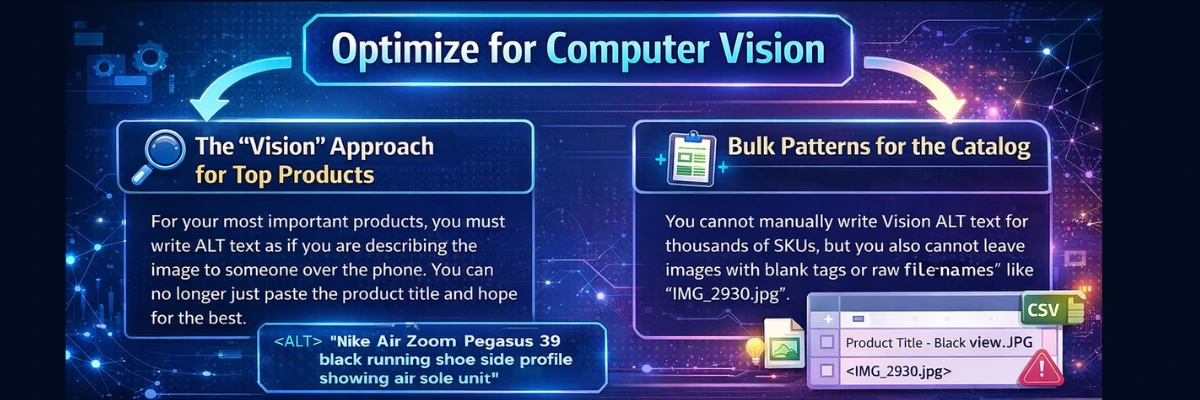
Generative AI models do not just read text; they “see” images using advanced Computer Vision. If your image ALT text is just a standard string of keywords (like “red running shoes”), the AI might ignore the image entirely.
To rank in visual AI searches, your ALT text must provide explicit visual context. We recommend a hybrid strategy: highly detailed manual descriptions for your top-selling products, and automated bulk patterns for the rest of your catalog.
The “Vision” Approach for Top Products
For your most important products, you must write ALT text as if you are describing the image to someone over the phone. You can no longer just paste the product title and hope for the best.
For example, a traditional SEO ALT text might simply be “Nike Air Zoom Pegasus 39”. An AI-optimized “Vision” ALT text should be much more descriptive: “Nike Air Zoom Pegasus 39 black running shoe side profile showing air sole unit”.
Do not forget to optimize your secondary product images. Instead of repeating the main title, describe exactly what the user is looking at, such as “Close-up of mesh material texture on toe box” or “Model tying laces on running track”.
Bulk Patterns for the Catalog
You cannot manually write Vision ALT text for thousands of SKUs, but you also cannot leave images with blank tags or raw file names like “IMG_2930.jpg”.
For the bulk of your catalog, use a Shopify SEO app or a CSV product export to automate a standardized naming pattern.
A highly effective formula to bulk-apply via Excel or your preferred app is: [Product Title] – [Variant] view. This simple automation ensures every single image provides a baseline level of context to the AI crawlers, making your entire catalog visually indexable.
Step 4: Build Trust Through Reviews and Brand Authority
Generative AI engines do not just want data; they want reliable data. Trust is a massive ranking factor for Large Language Models (LLMs). When a user asks an AI, “Are the AirRunner shoes actually good for wide feet?”, the AI looks directly at your customer reviews and your brand’s overall authority to formulate its answer.
Validating Review Schema
It is not enough to simply display five gold stars on your product page. The AI bots need to read the structured data behind those stars.
You must ensure your Shopify review app (whether it is Yotpo, Okendo, Loox, or Judge.me) is actively pushing the AggregateRating and individual Review properties into your product’s JSON-LD schema. If this data is locked behind a JavaScript visual widget that bots cannot easily render, the AI will assume your product has zero reviews and will hesitate to recommend it.
AI-Driven Review Generation
Generic reviews like “Great product, fast shipping!” offer zero contextual value to an AI algorithm. You need keyword-rich User-Generated Content (UGC). To achieve this, you must rethink your post-purchase email flows in platforms like Klaviyo.
Stop asking open-ended questions like “Tell us what you think.” Instead, prompt your buyers with specific questions that force descriptive, contextual answers. For example:
- “What specific activity did you use this product for?”
- “How does the sizing and fit feel compared to your usual brand?”
- “What specific problem did this item solve for you?”
This simple shift in your email marketing naturally generates the exact long-tail keywords and real-world use cases that AI models look for when answering complex user queries.
Establishing the “Knowledge Graph”
AI engines need to know your brand is a real, trustworthy entity, not a fly-by-night dropshipping operation. This is established through your store’s Organization schema, typically placed on your homepage.
You must heavily utilize the sameAs property within this schema. This property should link directly to your official social media profiles, your Crunchbase profile, and authoritative third-party review platforms like Trustpilot or the Better Business Bureau. Connecting these dots helps the AI confidently map your brand within its global Knowledge Graph, boosting your overall domain authority.
Step 5: Measuring the Impact
Traffic from generative AI engines does not look like traditional organic search. If you do not track it correctly, you might think your optimization efforts are failing. You need to adjust how you read your analytics.
Setting Up GA4 and GSC for AI
AI platforms often strip referral data to protect user privacy. Because of this, much of your new AI traffic will simply appear as “Direct” in Google Analytics 4 (GA4).
To get a clearer picture, create a custom segment in GA4. Filter your session sources to include terms like “openai”, “chatgpt”, “perplexity”, and “claude”. This isolates the users clicking through from AI chat interfaces.
In Google Search Console (GSC), you need to change your focus. Stop looking only at standard search clicks. Navigate directly to the “Merchant listings” and “Product snippets” tabs. This is where you monitor if Google’s AI algorithms are successfully reading your structured data.
Implementing IndexNow for Instant Discovery
Google is not the only player in the AI space. Bing actually powers the live search index for ChatGPT and several other major LLMs. You cannot afford to wait weeks for Bing to naturally crawl your Shopify store.
Connect your store to Bing Webmaster Tools and implement the IndexNow protocol. This feature automatically pings the search engine the exact second you update a product or publish a new page. It ensures the AI models always have your latest pricing, inventory status, and product context.
Conclusion: The Future of eCommerce Discovery
Optimizing for generative AI is not about tricking an algorithm. It is about translating your human marketing efforts into structured, factual data that machines can easily process and trust.
The eCommerce brands that fix their technical foundation and enrich their data today will be the default recommendations tomorrow. Those who ignore it will simply become invisible to the next generation of shoppers.
If you want to ensure your store is fully prepared for generative search without risking your current organic traffic, you need a specialized approach. At eCommerce Today, we act as a fractional eCommerce department for global DTC brands, implementing advanced AI optimization and managed growth systems to keep you ahead of the curve.